

We give you the option to use the Prem AI API, the PremAI SDK, or the OpenAI SDK.For API usage documentation, refer to the API Reference.
Create an API Key 🔑
Click the API Key button on the sidebar. Then click the + Create API Key button. Afterwards, copy the API key and save it in a secure location.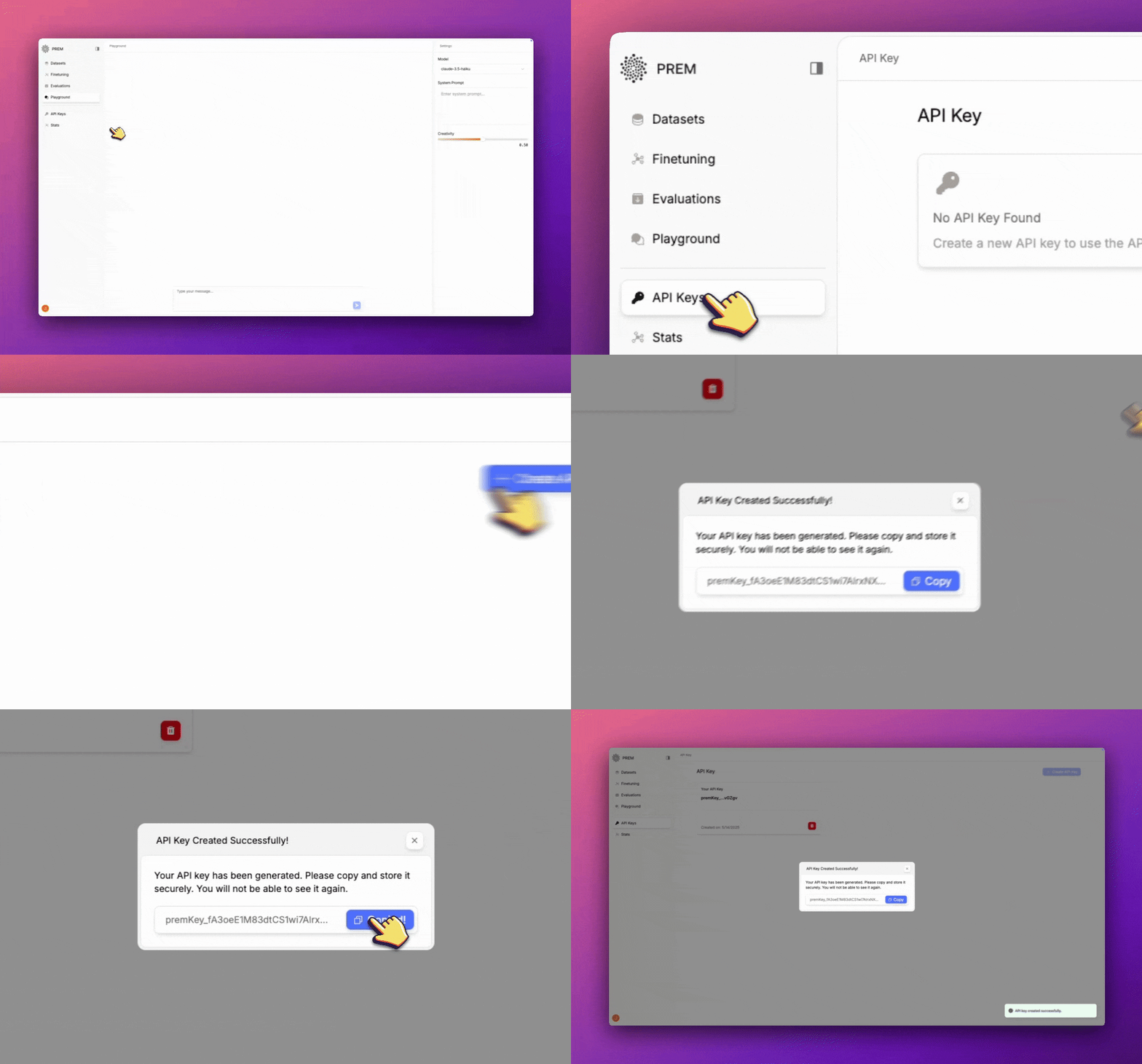
Use with PremAI SDK
Install the PremAI SDK
npm install premai
pip install premai
List Models
import PremAI from 'premai';

const client = new PremAI({
  apiKey: process.env['PREMAI_API_KEY'], // This is the default and can be omitted
});

const response = await client.models.list();

console.log(response.data);
import os
from premai import PremAI

client = PremAI(
    api_key=os.environ.get("PREMAI_API_KEY"),  # This is the default and can be omitted
)
response = client.models.list()
print(response.data)
Check Model Status
This is useful to check if a model is running or not. If it is not running, you can load it up using theload method.
The model name can be replaced with the name of your fine-tuned models as well.
import PremAI from 'premai';

const client = new PremAI({
  apiKey: process.env['PREMAI_API_KEY'] // This is the default and can be omitted
});

const response = await client.models.check_status(model="llama3.2-3b");

console.log(response);
import os
from premai import PremAI

client = PremAI(
    api_key=os.environ.get("PREMAI_API_KEY")  # This is the default and can be omitted
)
response = client.models.check_status(model="llama3.2-3b")
print(response)
Load Model
This is useful to load up a model for inference.The model name can be replaced with the name of your fine-tuned models as well.
import PremAI from 'premai';

const client = new PremAI({
  apiKey: process.env['PREMAI_API_KEY'] // This is the default and can be omitted
});

const response = await client.models.load(model="llama3.2-3b"); // Or any other model you want to load up

const modelStatus = await client.models.check_status(model="llama3.2-3b");

console.log(modelStatus);
import os
from premai import PremAI

client = PremAI(
    api_key=os.environ.get("PREMAI_API_KEY")  # This is the default and can be omitted
)
response = client.models.load(
    model="llama3.2-3b", # Or any other model you want to load up
)
modelStatus = client.models.check_status(model="llama3.2-3b")
print(modelStatus.data)
Unload Model
This is useful to unload a model from the server.The model name can be replaced with the name of your fine-tuned models as well.
import PremAI from 'premai';

const client = new PremAI({
  apiKey: process.env['PREMAI_API_KEY'] // This is the default and can be omitted
});

const response = await client.models.unload(model="llama3.2-3b"); // Or any other model you want to load up

console.log(response);
import os
from premai import PremAI

client = PremAI(
    api_key=os.environ.get("PREMAI_API_KEY")  # This is the default and can be omitted
)
response = client.models.unload(
    model="llama3.2-3b", # Or any other model you want to load up
)
print(response)
Chat Completions
import PremAI from 'premai';

const client = new PremAI({
  apiKey: process.env['PREMAI_API_KEY'], // This is the default and can be omitted
});

const response = await client.chat.completions({
    messages: [{
        role: 'user',
        content: 'Write a one-sentence bedtime story about a unicorn.'
    }],
    model: 'llama3.2-3b'
});

console.log(response.choices[0].message.content);
import os
from premai import PremAI

client = PremAI(
    api_key=os.environ.get("PREMAI_API_KEY"),  # This is the default and can be omitted
)
response = client.chat.completions(
    messages=[{
        "role": "user",
        "content": "Write a one-sentence bedtime story about a unicorn."
    }],
    model="llama3.2-3b",
)
print(response.choices[0].message.content)
import os
from premai import AsyncPremAI

client = AsyncPremAI(
    api_key=os.environ.get("PREMAI_API_KEY"),  # This is the default and can be omitted
)

# Create a chat completion
response = await client.chat.completions(
    messages=[{
        "role": "user",
        "content": "Write a one-sentence bedtime story about a unicorn."
    }],
    model="llama3.2-3b", # Or any other model you want to use
)

print(response.choices[0].message.content)
Chat Completion with Streaming
Streaming is not supported for the PremAI SDK. Will be supported in the future.
Use with OpenAI SDK
Install the OpenAI SDK
npm install openai
pip install openai
List Models
import OpenAI from 'openai';

const client = new OpenAI({
  baseURL: "https://studio.premai.io/api/v1/",
  apiKey: process.env['PREMAI_API_KEY'], // This is the default and can be omitted
});

const response = await client.models.list();

console.log(response.data);
import os
from openai import OpenAI

client = OpenAI(
    base_url="https://studio.premai.io/api/v1/",
    api_key=os.environ.get("PREMAI_API_KEY"),  # This is the default and can be omitted
)
response = client.models.list()
print(response.data)
Chat Completions
The model name can be replaced with the name of your fine-tuned models as well.
import OpenAI from "openai";

const client = new OpenAI({
    baseURL: "https://studio.premai.io/api/v1/",
    apiKey: process.env.PREMAI_API_KEY,
});

//Create a chat completion
const response = await client.chat.completions.create({
    model: "llama3.2-3b", //Or any other model you want to use
    messages: [{ role: "user", content: "Write a one-sentence bedtime story about a unicorn." }]
});

console.log(response.choices[0].message.content);
import os
from openai import OpenAI

client = OpenAI(
    base_url="https://studio.premai.io/api/v1/",
    api_key=os.environ.get("PREMAI_API_KEY"),
)

# Create a chat completion
response = client.chat.completions.create(
    messages=[{"role": "user", "content": "Who won the world series in 2020?"}],
    model="llama3.2-3b", # Or any other model you want to use
)

print(response.choices[0].message.content)
import os
from openai import AsyncOpenAI

client = AsyncOpenAI(
    base_url="https://studio.premai.io/api/v1/",
    api_key=os.environ.get("PREMAI_API_KEY"),
)

# Create a chat completion
response = await client.chat.completions.create(
    messages=[{"role": "user", "content": "Who won the world series in 2020?"}],
    model="llama3.2-3b", # Or any other model you want to use
)

print(response.choices[0].message.content)
Chat Completion with Streaming
import OpenAI from "openai";

const client = new OpenAI({
    baseURL: "https://studio.premai.io/api/v1/",
    apiKey: process.env.PREMAI_API_KEY,
});

//Create a chat completion
const response = await client.chat.completions.create({
    model: "llama3.2-3b", //Or any other model you want to use
    messages: [{ role: "user", content: "Write a one-sentence bedtime story about a unicorn." }],
    stream: true,
});

for await (const chunk of response) {
    process.stdout.write(chunk.choices[0].delta.content);
}
import os
from openai import OpenAI

client = OpenAI(
    base_url="https://studio.premai.io/api/v1/",
    api_key=os.environ.get("PREMAI_API_KEY"),
)

# Create completion
response = client.chat.completions.create(
    messages=[{"role": "user", "content": "Who won the world series in 2020?"}],
    model="llama3.2-3b", # Or any other model you want to use
    stream=True,
)

for chunk in response:
    print(chunk.choices[0].delta.content, end='', flush=True)
import os
from openai import AsyncOpenAI

client = AsyncOpenAI(
    base_url="https://studio.premai.io/api/v1/",
    api_key=os.environ.get("PREMAI_API_KEY"),
)

# Create completion
response = await client.chat.completions.create(
    messages=[{"role": "user", "content": "Who won the world series in 2020?"}],
    model="llama3.2-3b", # Or any other model you want to use
    stream=True,
)

async for chunk in response:
    print(chunk.choices[0].delta.content, end='', flush=True)